
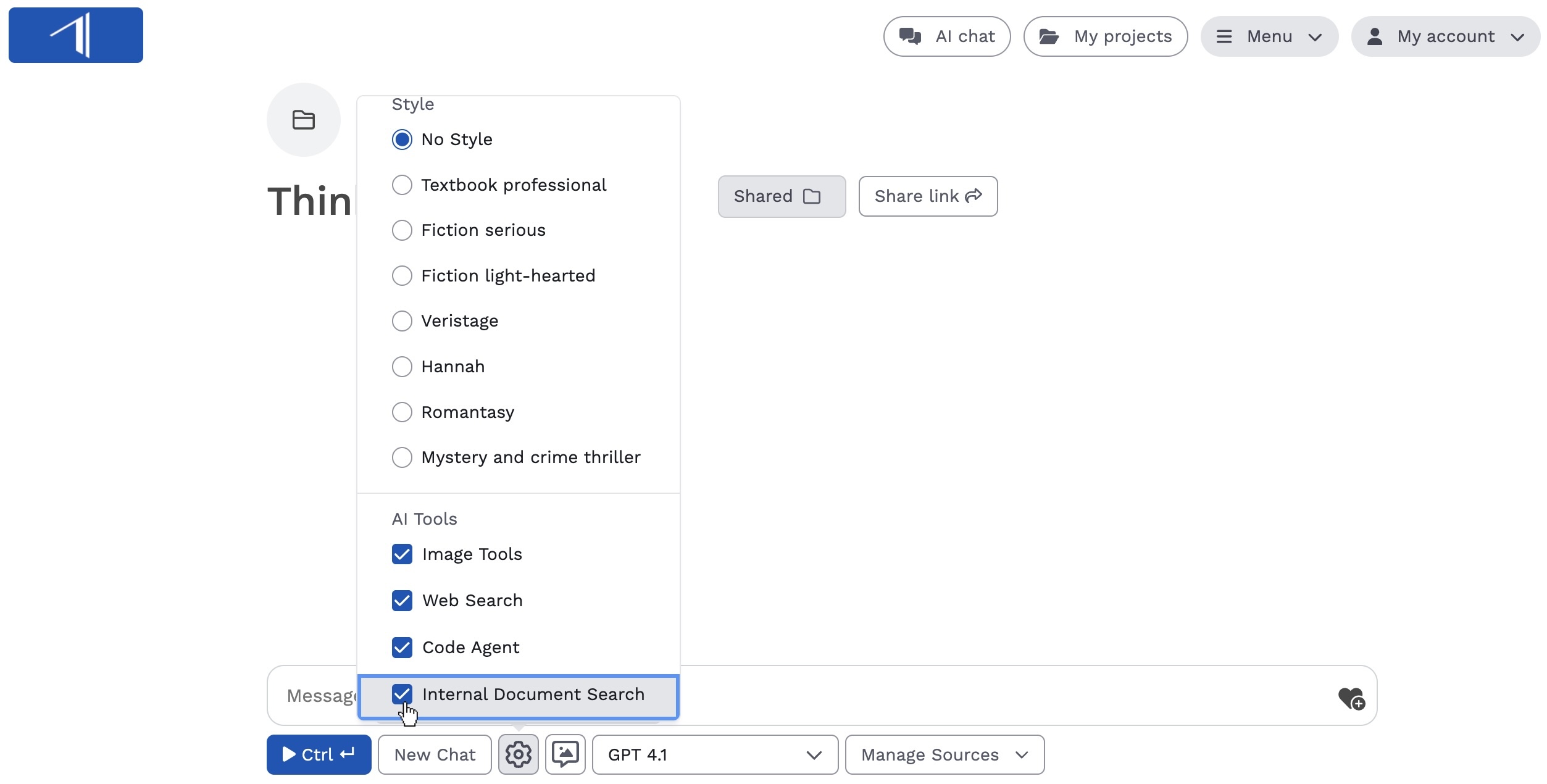
Go beyond keyword searches and find content by meaning. Insight’s agentic AI search tool is integrated into AI Chat. Find books, documents, and specific content in your Insight library based on your prompts and questions.
How does internal search work?
Internal search has a complete view of the books, documents, and content available to you in Insight, including the metadata and full text of your books.
It works by matching your chat query to the most relevant content, books, and documents in your library.
- You enter a search into AI Chat—for example: “Which books in my library mention tomato gardening?”
- Insight finds the most relevant content in your library, based on your prompt.
- Using the content it finds, Insight answers your question—in this case, with a list of books that mention tomato gardening.
- You can continue chatting with this content or ask Insight to narrow down the results.
Step-by-step: How to use internal search
- Start a conversation in AI Chat.
- Choose GPT 4.1 as your LLM.
- Click the settings (gear) icon and make sure the “Internal search” tool is selected.
- In your prompt, ask Insight to “search your library” or tell you “which books” you have that match your criteria. Similar phrases will also trigger an internal search.
- The response will include an answer to your prompt, like a list of books or a summary.
- Below the response, click on the “Internal sources” box to see a full list of content used to create the answer. Click on a source to view the content or open the document.
What can you search for?
Broad searches:
Try searching for topics, themes, or genres. You can also combine these larger topics to further narrow down your search.
- “Do I have any books about Japan?”
- “Give me a list of my thriller books.”
- “Which of my mystery books also have supernatural elements?”
Specific searches:
Ask more specific questions about types of characters, locations in your books, authors, or even specific Thema or BISAC codes.
- “Give me a list of my books written by Paige Turner”
- “Which of my books are set in London?”
- “Search my library for mystery books with a female protagonist.”
- “Give me a list of my books classified with the BISAC code Personal Growth (SEL031000).”
Search for styles and qualities:
Try searching for characteristics that are hard to categorize or classify, like “serious fiction” or “summer beach reads.”
- “Give me a list of my serious fiction books.”
- “Search my books for literary fiction that might appeal to male readers.”
- “I’m preparing a summer marketing campaign. What types of books make good beach reads, and which of my books would be a good fit for this campaign?”
Mentions and subtopics:
Ask for granular information buried in your books and content.
- “Do I have any books that mention Albert Einstein?”
- “Which of my books include references to ancient Egypt?”
- “Give me a list of my books that mention growing tomatoes.”
More ways to use internal search
Editorial and acquisitions:
- Use internal search to find books in your backlist that are similar to books you’re considering for publication.
- Quickly find an author’s previously published work in your catalogue.
- Identify thematic gaps and opportunities in your catalogue.
Marketing:
- Identify books related to currently trending topics and themes.
- Build book lists for seasonal marketing campaigns.
- Create SEO posts for content marketing. (For example: “I want to create a guide for readers on Japanese cuisine. Search my library for books on this topic.”)